01 / 07
The browser, HTTP request/response and DevTools.
The web is a conversation between two sides. The client is your device and the browser running on it. The server is the computer that hosts pages and applications. When you open a page, a copy of its code travels from the server to your browser, and the browser draws it on screen.1
A website is not a single file. Code files (HTML, CSS, JavaScript) and assets (images, video, fonts, PDFs) are downloaded separately and assembled in the browser.1
When you type https://example.com and press Enter, roughly this happens:12
The browser decides whether what you typed is a search or an address.
It uses DNS to find the IP address of the server behind the domain name.
It opens a connection to the server; if the address is https, that connection is encrypted with TLS.
It sends an HTTP request.
The server returns an HTTP response; the data arrives in small (packet) pieces that the browser reassembles in the right order.
The browser reads the HTML, asks for the CSS, JavaScript and images it needs, and draws the page.
The sections below take these steps one at a time.
Take https://www.example.com:443/products/book?color=blue&page=2#reviews:3
| Part | Example | What it does |
|---|---|---|
| Scheme | https | Which protocol to ask with |
| Domain | www.example.com | Which server to go to |
| Port | 443 | The door on the server; left out for the standard ports (HTTP 80, HTTPS 443) |
| Path | /products/book | Where the resource sits on the server |
| Parameters | ?color=blue&page=2 | Key/value pairs sent to the server |
| Anchor | #reviews | A place inside the page; never sent to the server |
DNS (Domain Name System) is the address book of the internet: it turns a readable name like example.com into a server's IP address, such as 192.0.2.172.1 Large sites run on more than one server, so the same name can resolve to a different IP depending on where you are.1
The browser looks for the answer in its own cache first, then in the operating system's. If it is in neither, the question goes to a recursive resolver (usually your internet provider's, or a service such as 1.1.1.1 or 8.8.8.8). The resolver asks a root server, then the server for the extension such as .com, and finally the domain's authoritative server, where the real record lives.4
Every record has a TTL (time to live), and caches keep the answer for that long. That is why a DNS change does not reach everyone at once. "No such domain" gets cached too.5
HTTP is the language the client and the server speak. The client always starts the request.6 Every message has a start line, headers, a blank line and an optional body.7
GET /products HTTP/1.1
Host: example.com
Accept-Language: en
HTTP/1.1 200 OK
Content-Type: text/html
Content-Length: 29769
<!doctype html>…The request line carries a method (what to do), a target (the path) and the protocol version. The most common ones are GET to read data and POST to send it; a body is usually only there on POST, PUT and PATCH requests.7
The status code in the response says how it went. The first digit gives the class:8
| Code | Meaning | Common ones |
|---|---|---|
1xx | Informational | |
2xx | Success | 200 OK |
3xx | Redirection | 301 moved permanently, 304 the cached copy is still good |
4xx | Client error | 404 not found, 403 no access |
5xx | Server error | 500 the server did not know what to do |
HTTP is stateless: nothing connects two requests on its own. Staying logged in, or a cart that survives, is the work of cookies.6 There can also be proxies between the browser and the server: a cache, a load balancer, a security layer.6
What the messages mean stays the same across versions; what changes is how the data travels. In 2024, 70% of mobile home pages were served over HTTP/2, 9% over HTTP/3 and 21% over HTTP/1.1.9 That HTTP/3 figure looks lower than it is: a browser only uses HTTP/3 once the server has advertised support for it, so the measurement undercounts it. Counting sites by that advertisement instead brings the share close to 30%.9
HTTPS is HTTP encrypted with TLS; nobody in between can read or change the content.10 It is the default now: in 2024, 98% of mobile requests came over an encrypted connection.11
Many browser features, among them the camera, the microphone and service workers, only work in a secure context, which means HTTPS. http://localhost counts as one, so you do not need a certificate while developing.12
When the HTML arrives, the browser reads it and turns it into a tree, the DOM (Document Object Model), where every element, attribute and piece of text becomes a node.13 As it reads, it fires off new requests for the <link>, <script> and <img> elements it meets.13
It then attaches the CSS rules to the matching nodes, works out the size and position of every box (layout) and paints the pixels on screen (paint). JavaScript runs alongside this and can change the DOM, and with it the picture. An accessibility tree is also built from the DOM, for screen readers.13
Tip
Browsers such as Chrome mostly run tabs in separate processes. That is why the others keep working when one tab freezes.14
The browser's developer tools let you see everything this lesson describes with your own eyes. Open them with Ctrl + Shift + I or F12 on Windows, ⌘ + ⌥ + I on macOS; right-clicking an element and choosing Inspect works too. In Safari you first have to turn on the Develop menu in the settings.15
| Panel | What it's for |
|---|---|
| Elements | Seeing the live DOM and the CSS applied to it, and editing both on the spot |
| Console | Reading errors and running JavaScript on the page |
| Sources | Setting breakpoints in JavaScript and stepping through it |
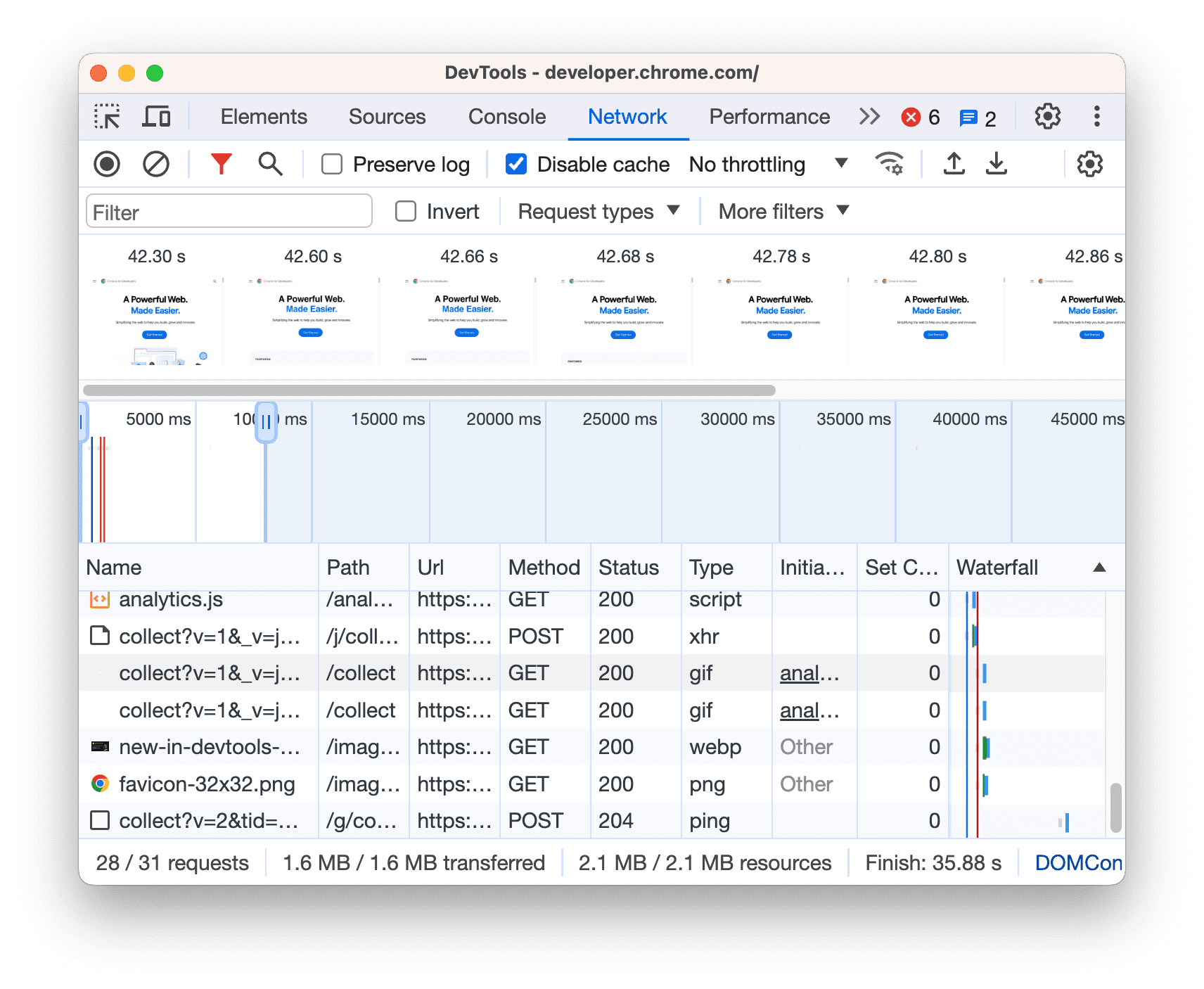
| Network | Seeing every request the page makes, with its status, size and timing |
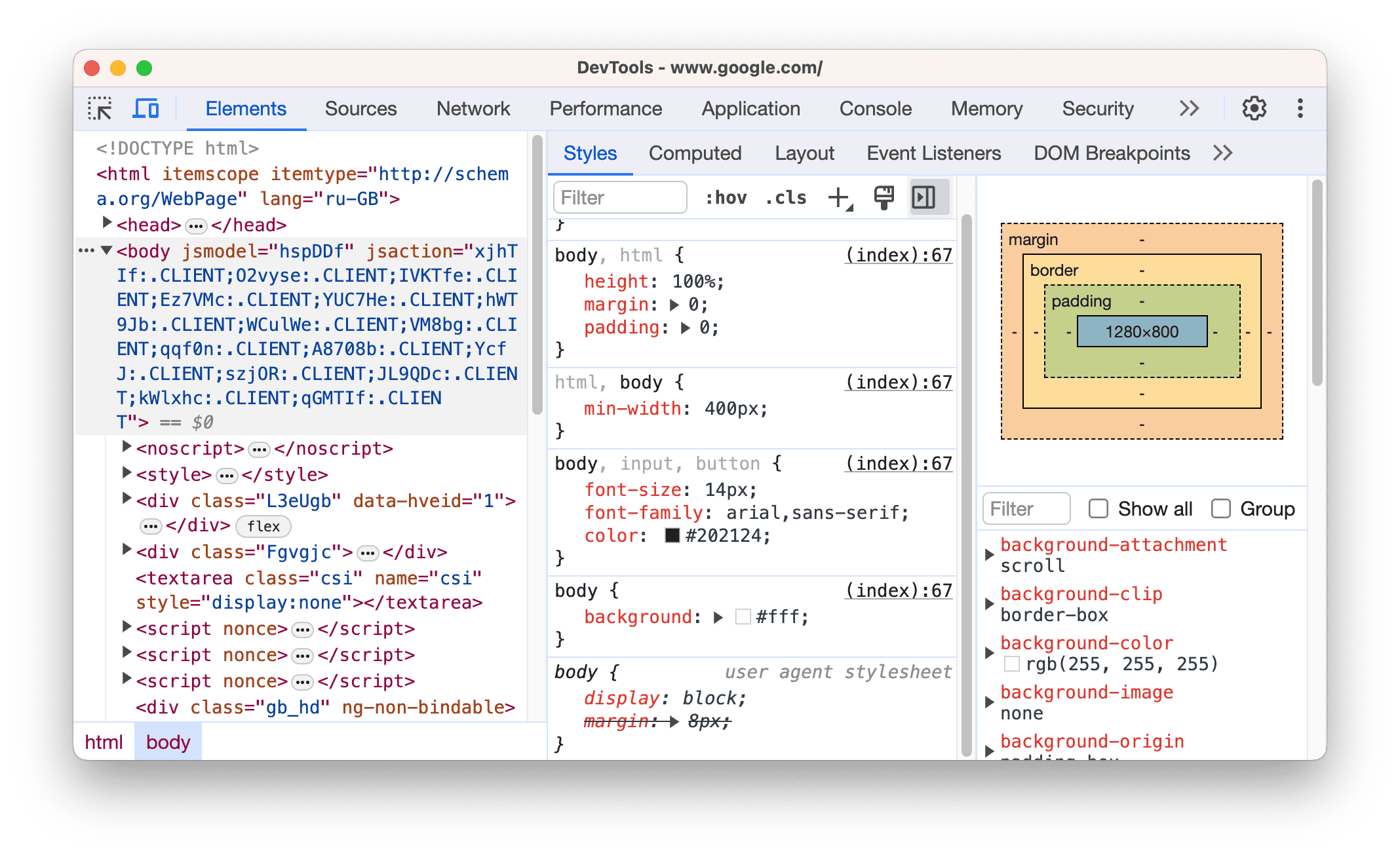
Click a request in the Network panel and the Headers tab shows the request and response headers, while the Response tab shows what the server returned. The Status column gives the response code, and Initiator says what started the request.16
The whole page load: MDN's guide to every step from DNS to paint, from a performance angle.18
Inside the browser: Mariko Kosaka's four-part, illustrated series on Chrome's architecture.142
The network layer: Ilya Grigorik's free book High Performance Browser Networking, on TCP, TLS and HTTP/2.19
Try DNS by hand: Julia Evans's Mess With DNS, where you get your own subdomain, add records and watch the queries arrive live.20
Talk: Julia Evans's RubyConf Mini 2022 keynote on DNS and on learning hard subjects.5
Check the lesson's main ideas with three questions.
Your progress is stored only in this browser.
Last updated: November 3, 2026
